The Focus System for People Who’ve Already Quit Social Media
You've deleted the apps. Your browser is still a minefield: muscle-memory URL typing, attention-hijacking tabs, and a new tab that does nothing for your goals. Ikizen turns it into a command center for entrepreneurs and makers, with your goals, your habits and what you actually shipped today on every new tab.
Start with the free browser extension. A paid plan takes your setup to your other browsers and the Android and iOS companion app, including website blocking and your commit streak.
The Firefox extension is signed by Mozilla and distributed here as a self-hosted add-on.
Ikizen started as a new tab page. It is now three things sharing one account, and most people end up using all three.
The dashboard
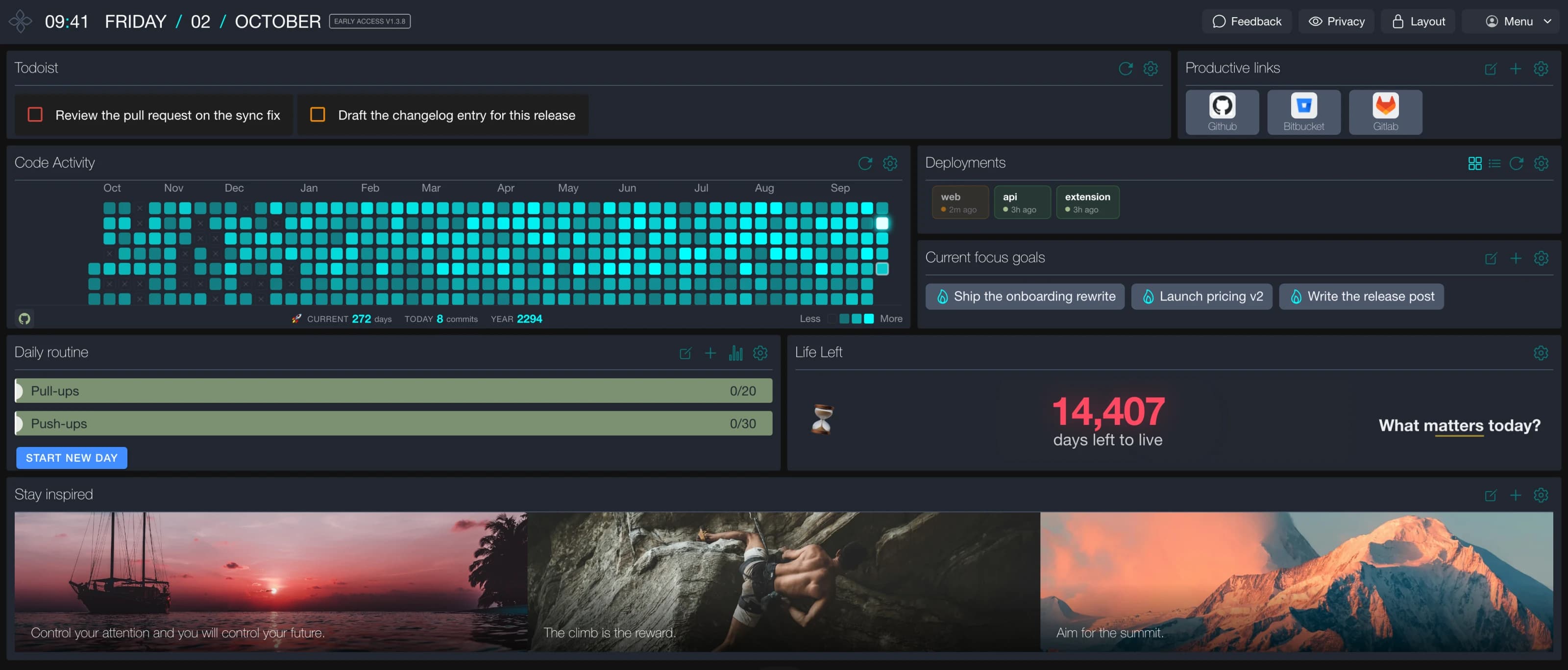
Every new tab opens on what you are actually trying to do. Your focus goals, today's tasks, the habits you are keeping, your contribution wall, your pipelines, and only the links that help you work. Drag the widgets where you want them. Turn off the ones you do not.
This is the part most people install for, and it is free.
The blocker
Blocking on its own does not work. You disable it in week two. Ikizen puts something in the way instead: when you reach for a site you told it to guard, you get your own reasons back before you get the site.
It also quiets the tricks. Tab titles that change to pull you back, favicons that fake notifications, YouTube Shorts, the algorithmic feed on X. All optional, all off by default until you want them.
The phone
The companion app handles the device that undoes most focus systems. Open it and notifications go quiet while you work. A home screen and lock screen widget keeps your commit streak visible without opening anything at all. And if you have an old phone spare, the same app turns it into a permanent commit wall for the corner of your desk.
It reads the setup you already have in the extension, so there is nothing to configure twice. It comes with sync.
What it costs
Everything on your machine is free, forever, with no account. Sync and backup across browsers and devices is the paid part, and it is what carries your setup to the phone on your desk.
Goals are easy to write and easy to quietly drop. What is harder to argue with is a year of your own output on the screen in front of you.
The wall
Code Activity draws your contribution history across GitHub and Bitbucket as one graph, because your work is not split the way your accounts are. The streak counts both together, today stays pending until you commit, and you can set one or two grace days if you do not want a Sunday off to wipe out three months.
Deployments
Pipeline status for the repos you pick, in one strip. A passing build is the boring default and gets no color at all. Only a run that is in flight, one that failed, or one that just finished is allowed to take your attention. It is a status widget that stays quiet, which is the only kind worth having on a page you open fifty times a day.
Why this matters more than it used to
Something shifted in the last couple of years. A model does a lot of the typing now, and the scarce part moved: deciding what is worth building, and staying on it long enough to finish. Starting is cheap. Abandoning is just as cheap.
The wall is indifferent to how the code got written. It fills in on the days you shipped something and stays dark on the days you did not, and after a few weeks that turns out to be the most honest feedback in your week. Call it vibe coding if you want. It still wants a commit.
And away from the browser
The same streak runs on your phone through the companion app: on the home screen, on the lock screen, and on an old handset parked on your desk if you have one going spare. A browser tab is easy to close. A lock screen is not.
You deleted the distracting apps. Their websites still fit in your pocket.
The Ikizen companion brings your website-blocking rules, commit wall and goals from the browser to Android and iOS. It uses your synced setup, so you do not have to maintain a second block list.
Your website rules on your phone
Set your sites and schedules in the desktop extension and let them sync. On your phone, open Settings, choose BLOCKING and enable it. The app asks for the system permission it needs before enforcing your rules.
Android website blocking is included in the public Google Play release. Open your account in the desktop extension to find the download link once your paid plan is active.
Android uses a local VPN to filter blocked domains. It supports your chosen bypass rules; optional overlay permission lets Ikizen show its block screen over the browser. Your web traffic is not routed through an Ikizen server.
On iOS 16 or later, Screen Time blocks sites in Safari. Apple displays the blocked-site page, with no custom image or bypass. You can choose whether rules that allow a bypass on desktop are enforced outright on this phone. Native apps are outside the scope of website blocking.
A focus switch
Open the app when you sit down to work and notifications go quiet. On Android it switches to alarms-only Do Not Disturb for as long as the wall is up and puts your settings back afterwards, and it never overrides a Do Not Disturb you set yourself. On iOS, apps are not allowed to touch Focus, so the app walks you through a one-time Shortcuts automation that does the same thing.
The wall is what you see while it is silent. Starting a work session and seeing your streak is a better trigger than a timer going off.
Your streak, without opening anything
A home screen widget carries your streak and a mini contribution wall on both platforms. It is correct at midnight, because it knows in advance whether tonight breaks your run and rolls over on its own with the app closed.
On iOS it works on the Lock Screen too: a ring showing today's commits, scaled to your own busy days rather than an arbitrary target, or a rectangular version with the streak and a progress gauge. In StandBy you get the full-colour widget.
On Apple Watch, add the streak complication or open the watch app for a small contribution wall. Its data comes from your paired iPhone.
A permanent desk display
If you have an old phone in a drawer, this is the other way to run it. Give it a stand, put it sideways next to your keyboard, and leave it there. Landscape, screen awake, full contribution wall big enough to read from across the room, with new pushes landing on today's cell while you work. Your focus goals sit under it as pills and pipeline status sits in the header as one quiet chip.
Two looks: the Ikizen dashboard theme, or green terminal text on pure black.
What you need
An existing Ikizen account with a paid plan, active sync and the Code Activity widget set up in the desktop extension. There is no signup or checkout in the phone app. The app reads the configuration you already have and never writes to it, so there is nothing to keep in step by hand. GitHub and Bitbucket are counted together, and the streak uses the same rules as the extension. Counts can refresh at different times on different devices.
Your commit data goes from GitHub and Bitbucket to the device and nowhere else. We do not collect it.
Available for Android and iOS. Open your account in the extension to find both download links once your paid plan is active.
As an entrepreneur or maker, you spend a lot of time in your browser. Ikizen will take your in-browser productivity game to the next level.
Maximize productivity with a personalized dashboard
Transform your new tab into a command center for productivity. With customizable widgets that track daily habits, tasks, and inspirations, you're not just opening a tab; you're stepping into a workspace tailored to keep you focused and driven. Every new tab is a fresh opportunity to align with your goals.
Build intentionality through intelligent friction
Transform impulse browsing into conscious choices. When you drift toward time-wasting sites, Ikizen creates a moment of reflection with your personal motivation system. Your browser becomes a tool for intentional action, not mindless consumption.
Features
Change your new tab to a personalized productivity dashboard with widgets that help you stay focused and motivated
Transform impulse moments into intentional choices with customizable friction and reflection prompts
Silence attention-hijacking tabs that manipulate titles and favicons to steal your focus
Integrate Todoist and see your top tasks every time you open a new tab
Set up your inspiration or vision board with images and quotes that set your soul on fire
Draggable and resizable widgets to fully customize your dashboard
Keep only the links that help you get stuff done to avoid dangerous distractions that regular new tabs usually have
Highlight your weekly / monthly / yearly goals with a simple goals widget
Track your daily habits / workouts / reading / etc with simple tracking widget
Control how many tabs you have open with a simple tab counter & limiter
Integrate your favorite habit tracking app for even more powerful habit tracking (future milestone)
Helpful privacy mode for when in public or sharing screen
Memento mori: visualize your remaining life to prioritize what matters most
Stay consistent with your craft by tracking GitHub/Bitbucket streaks and coding activity
Who is this for
you have deleted all brainrot apps like IG, FB, Reddit, etc and the remaining frontier is the browser
you are Enlightened on Todoist
Who this is not for
You have brainrot apps like IG, FB, Reddit, etc installed (go use opal.so or something more relevant)
Everything in your browser is free, forever. One thing costs money: taking it with you.
Free, in the browser you are using
Every widget, including the commit wall and pipeline status
Site blocking and all the distraction controls
No account needed, no trial running out
Not a demo tier. The whole product.
Paid, everywhere else
Your setup on every browser and machine you work from
The Android and iOS companion app, with your synced website-blocking rules, commit wall and streak widgets
A cloud backup, so a wiped profile is an inconvenience instead of a loss
It is one thing, not three. The app is not a separate feature bolted on, it is the same setup running somewhere other than your browser. Your goals, your wall, wherever you happen to be.
Ikizen's mission is to elevate human productivity by enhancing focus and motivation for entrepreneurs and makers.
The name Ikizen comes from a combination of Ikigai ("Reason for being") and Kaizen ("Change for better").
Those two words describe the problem better now than when the product started. Building something has never been faster, and knowing what is worth building has never been harder to hold on to for more than an afternoon. Purpose and steady progress are the two things no tool can generate for you. Ikizen is built to keep both of them in front of you.
Principles
Never show ads, since that will build wrong incentives for the product